addictivity.wordpress.com

Friday, 22 June 2012

Thursday, 21 June 2012
3 Ways to Get Competitive and Burn More Calories While You Run

- Beat your own pace: Who says you have to compete with someone else? If you feel weird going up against another person, then go up against yourself. One way is to track your time for a certain number of miles, and the next time you run, see if you can shed a few seconds off your time. Running at a faster pace will burn more calories and tone your lower body.
- Rack more miles than your running buddy: Challenging a running buddy is also a great way to be competitive while also keeping it fun and friendly. You can do it even if you don't run together! Try this: see who can run more miles in a week. You can follow the honor system and track your miles, or make a game of it using the Nike+ GPS running app ($2). Just tap "Outrun Your Friends," and whoever runs the shortest distance is "IT." Even if you don't beat your friend, you'll probably end up running more miles than you would if you weren't competing, and more runs mean more total calories burned.
- Outlast a stranger: To make it even more exciting, race against an unknowing stranger. This works best at the gym since there are always other people on the treadmill, but you can also do it outdoors if you can find a park or other place with many other runners. Find someone who's starting around the same time as you and see if you can either beat their pace or their mileage. You'll secretly hear the crowd applauding in your head when they stop running and you're still going strong. But you'll also end up running faster or longer, which translates to a bigger calorie burn.
Wednesday, 20 June 2012
Powdered Drinks, iPhone Shortcuts, and Exploding Laundry Detergent

Avoid Clumps in Powdered Drinks by Pouring Slowly
Here's a simple but effective method for avoiding the clumping when you use those "just add to bottled water" packets of Gatorade and the like. Pour slowly. When I rush and just dump it in, it always clumps. And when it happens it's usually at the bottleneck making it a real challenge to properly shake so it dissolves thoroughly. If you pour slowly you avoid the clumping almost completely. I say almost because not all of these drink mixes are created equal. The ones that are harder to dissolve will likely be harder to avoid clumping with in its entirety. All this said, the mix can just settle to the bottom and clump there, so you might mix in a little, give it a swirl, then mix in some more. Either way, it's easier than the alternative I've described.
Bonus tip that I read right off the bottle. Take a sip or two before adding the mix. If it does clump, it won't be in the bottleneck and shaking will be easier. And you avoid the mess of getting concentrated, wet mix all over the mouth of the bottle (and in my case, the lid and my finger as well).

Bonus tip that I read right off the bottle. Take a sip or two before adding the mix. If it does clump, it won't be in the bottleneck and shaking will be easier. And you avoid the mess of getting concentrated, wet mix all over the mouth of the bottle (and in my case, the lid and my finger as well).

Use iOS' Text Expansion for Usernames and Passwords
The Shortcuts feature in the iPhone keyboard settings is a great place to store frequently used user data for login forms or sign up pages. Just add a new shortcut and make the phrase section what you want to fill out with a corresponding shortcut.
For example, I use "em" as my email shortcut so on any form I fill out I just have to type "em" and it drops my email in.
I also have "pw" set up for a password and use "addy" for my street address


For example, I use "em" as my email shortcut so on any form I fill out I just have to type "em" and it drops my email in.
I also have "pw" set up for a password and use "addy" for my street address

Keep Detergent Bottles Off the Top of Your Laundry Machine to Avoid Spills
So I get home and head to the bathroom and this is what I see: laundry detergent all over the floor and walls.. It turns out the detergent bottle fell off from the top of the dryer (it's one of those stacked units). It must have just inched closer and closer to the edge during all of those vibrations and then just fell off. So here's my Lifehacker tip: DON'T SET LAUNDRY DETERGENT ON TOP OF STACKED WASHER/DRYER UNITS. Bad things will happen.

Use a Plain Black Image to "Turn Off" Mobile Wallpaper
This will definitely be old old news to anyone who has owned PMPs or mobile phones for a long time. I have to tread carefully and mind the geeks.
MY new Sony Walkman doesn't have a "no wallpaper" option. So I used a program to create a new empty image colored black, at 640x480, gave it a jpg extension, sent it to the player, and set *that* as wallpaper. Much better, I think.
If anyone wants to do this, the details are really going to vary. I used IrfanView on Win7 to create the image, but anything will surely do for the same task. And of course, it's going to vary one whole 888 of a lot on the player itself. I have the NWZ-E465 player. Anything else in that series ought to let you use the Option button to bring up a mini context menu when you're viewing a pic, and an entry to set that pic as wallpaper.
(Source : LifeHacker - http://lifehacker.com/5920069/powdered-drinks-iphone-shortcuts-and-exploding-laundry-detergent/)
MY new Sony Walkman doesn't have a "no wallpaper" option. So I used a program to create a new empty image colored black, at 640x480, gave it a jpg extension, sent it to the player, and set *that* as wallpaper. Much better, I think.
If anyone wants to do this, the details are really going to vary. I used IrfanView on Win7 to create the image, but anything will surely do for the same task. And of course, it's going to vary one whole 888 of a lot on the player itself. I have the NWZ-E465 player. Anything else in that series ought to let you use the Option button to bring up a mini context menu when you're viewing a pic, and an entry to set that pic as wallpaper.
(Source : LifeHacker - http://lifehacker.com/5920069/powdered-drinks-iphone-shortcuts-and-exploding-laundry-detergent/)
Facebook user numbers dwindling

Last month, Facebook attracted 158.01 million unique visitors in the United States, edging lower from 158.69 million in April and 158.93 million in March, comScore said.
Keeping users coming back -- or combating fatigue -- is crucial for all social media services, analysts say. Facebook is consistently trotting our new features, including the "Timeline" interface rolled out this year, and more are expected with the deal to acquire popular photo-sharing app Instagram.
ComScore has changed how it counts users, making year-ago comparisons harder. Under its old methods, comScore previously said Facebook had 157.22 million visitors in May 2011, which would make Wednesday's data a year-on-year increase of just 0.5 percent.
The changes comScore made generally reduce user numbers, so in an apples-to-apples comparison, user growth would look slightly bigger, a comsScore spokesman said.
Users spent an average of 380.8 minutes, or more than six hours, on the site in May this year, up slightly from 378.9 minutes in April.
In April last year, as measured under comScore's old techniques, users spent 374.9 minutes on the site.
Facebook was heavily criticized for the handling of its initial public offering in May, and critics have also questioned the efficacy of its ads.
One oft-cited reason for buying Facebook stock was the company's rapid growth.
The company's shares debuted at $38, but dipped well into the $20s before recovering some ground in recent weeks. On Wednesday shares closed at $31.60, down about 1 percent.
About two out of five people polled by Reuters and Ipsos Public Affairs said they used Facebook every day. Nearly half of the Facebook users polled spent about the same amount of time on the social network as six months ago.
Tweak Your Jailbroken iPhone to Look and Act More Like iOS 6

If you've seen a few screenshots of iOS 6, you know Apple's made some nice interface enhancements, such as a better sharing menu, dialer, and music player. If you've got a jailbroken iPhone running iOS 5, you can bring those changes to your device right now.
.

One of the smaller but very welcome changes in iOS 6 is the way you share things. Instead of getting a long list of buttons, you now get a grid of labeled icons that looks a lot like your home screen. This is a better, more visual approach to sharing. To get this feature on your iPhone right now, you just need to search Cydia for a tweak called iOS 6 Photo Sharing Menu (Free).
After you install it, you don't need to do anything other than try to share a photo. Open up your Photos app and give it a try. You'll be presented with the grid you see to your right. You'll notice it includes Facebook sharing, which is a new option in iOS 6. While this button won't work as seamlessly as it will in the real upgrade, it does function. You'll just be sent to Safari to authorize Facebook sharing through the tweak and then you'll be able to directly share your photos without issue.
 If you really want your iPhone to adopt the new interface elements in iOS 6, you're going to need the iOS 6 Winterboard theme. To get it, just search Cydia for iOS 6 and it'll come right up. You can install elements, such as the music player and dialer, separately if you want, or you can just get the entire package. You'll need Winterboard to actually use this theme, but if you don't already have it installed, Cydia will take care of that for you when you attempt to add the iOS 6 theme itself.
Once you've got everything installed, your device will reboot. When it's back up and running, look for Winterboard on your home screen. Open it up, check off the tab labeled "iOS 6," and tap the Respring button. Your home screen will reload and you won't notice anything new outright, but if you open up the Phone or Music app you should see the changes right away.
Source : LifeHacker
 If you've seen a few screenshots of iOS 6, you know Apple's made some nice interface enhancements, such as a better sharing menu, dialer, and music player. If you've got a jailbroken iPhone running iOS 5, you can bring those changes to your device right now.
 .
Add iOS 6's Improved Sharing Menu

After you install it, you don't need to do anything other than try to share a photo. Open up your Photos app and give it a try. You'll be presented with the grid you see to your right. You'll notice it includes Facebook sharing, which is a new option in iOS 6. While this button won't work as seamlessly as it will in the real upgrade, it does function. You'll just be sent to Safari to authorize Facebook sharing through the tweak and then you'll be able to directly share your photos without issue.
Add iOS 6's Interface Elements
Once you've got everything installed, your device will reboot. When it's back up and running, look for Winterboard on your home screen. Open it up, check off the tab labeled "iOS 6," and tap the Respring button. Your home screen will reload and you won't notice anything new outright, but if you open up the Phone or Music app you should see the changes right away.
Source : LifeHacker
Tuesday, 19 June 2012
What's in Microsoft's new Surface tablet

Not actually a Surface.
Microsoft's intent with the Surface tablets is to create hardware that puts the software front and center; to provide the hardware necessary to allow Windows 8's strengths to really come to the foreground. At the launch event, however, the software took the back seat. This was all about the hardware, and with good reason.
The Surface tablets are smart, good-looking, carefully considered, well built, slick pieces of kit, and there's nothing even close on the market today. Of course, they're not on the market today either, but unless the PC OEMs inject a serious dose of quality in their their build and design processes, the Surface units will stand alone when they eventually go on sale.
Microsoft still isn't ready to let Joe Public get their grubby little hands on Surface. At the press event, we were given a number of demonstrations, shown a number of non-functional demo units, and given scant few seconds to touch real working devices. The Intel Core i5-powered Surface for Windows 8 Pro devices were not on display, either; only the ARM-powered Surface for Windows RT was available. However, the major design points are common between the two.
Surface for Windows RT's basic specs set the scene. It's 9.3 mm thick, has a mass of 676 grams, and sports a 10.6" 1366×768 screen. That puts it in the same size and weight ballpark as the iPad, though with a lower resolution 16:9 screen instead of the iPad's high-resolution 4:3 display. From a size and portability perspective, the Surface gets it right, but that's not unique.
What makes Surface special is the attention to detail. The standard of the fit and finish of the prototypes on display was extremely high. The shell of the Surface is made of cast magnesium, with a vapor-deposited finish called VaporMg. The result is an attractive, scratch-resistant finish that's easy to grip and comfortable to hold.
The company explained that its casting and finishing process allows it to create edges as thin as 0.65 mm—less than the thickness of a credit card—and that these narrow castings and tight tolerances are essential to the device. Put a piece of sticky tape inside the Surface when you assemble it, and the finished product will bulge, it's so tightly packed together.
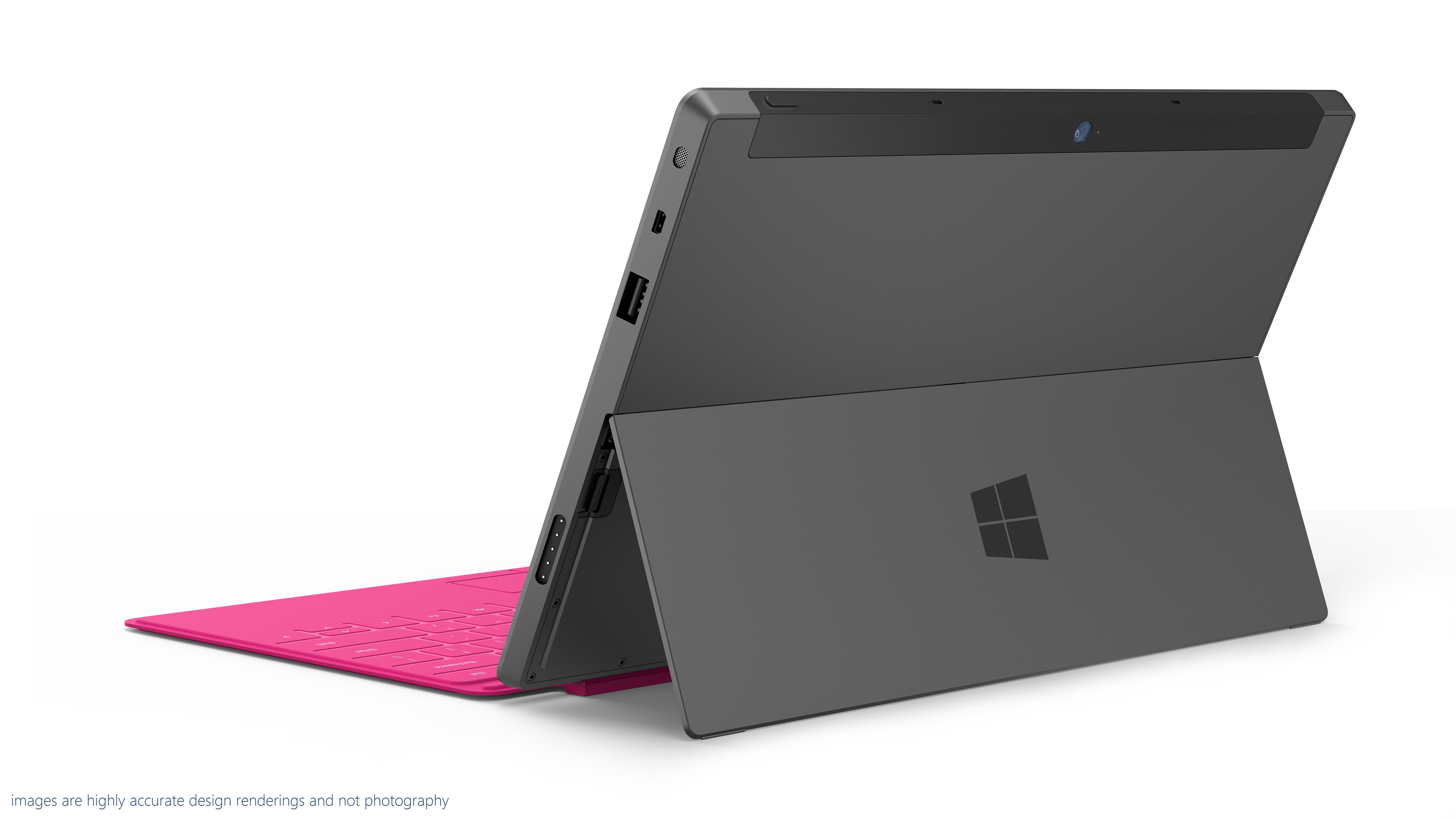

The small chamfer on the edge allows easy opening of the kickstand.
Another feature that was mentioned repeatedly was an angle; 22 degrees. The edges of the device are all chamfered at 22 degrees, an angle that Microsoft says makes the hardware fade into the background and comfortable to hold (though we'd have to have a lot more time with it to see if that's really true in practice). The kickstand also holds the screen at 22 degrees.
On its own, the angle is no big deal. But the attention to detail comes into play. The Surface has front and rear cameras. The rear cameras isn't, however, mounted so that it looks out perpendicular to the case. It's angled at 22 degrees too, so that when using the kickstand, the cameras looks straight out, rather than down.
If the company was pleased with the kickstand, it was positively boastful about the Surface's pair of combination keyboard-covers. There's the Touch Cover, available in five colors (grey, white, blue, pink, and orange), which integrates a multitouch keyboard into a 3 mm thick screen cover, and the Type Cover, which integrates a real keyboard with keyswitches into a slightly thicker cover.
Touch Cover has no keyswitches. It's based on pressure sensors, with the "keys" distinguished from each other with a different texture. There's plenty of smarts in the Touch Cover. Touch typists tend to rest their fingers on the home row. With a naive touch keyboard, that results in a lot of stray key presses. The pressure applied during real keypresses is different, however, from that of resting on the home row, and the logic in the keyboard can tell the difference.
The keyboards also include gyroscopes so they can tell when they've been folded back behind the Surface, so that they can be disabled when tucked out the way.
How well does all this cleverness work? That we don't know. Microsoft says that the Touch Cover allows typing speeds twice as fast as those possible on glass, but until we can actually use one, the company's claim is untested.
Both covers connect to the Surface with a satisfyingly solid magnetic connector. It's designed to mate automatically without requiring careful alignment, and that certainly worked well.

The magnetic connector snaps together with ease.
(Thanks to Peter Bright of Ars Technica)
http://arstechnica.com/information-technology/2012/06/a-first-look-and-feel-of-microsofts-first-pc/?utm_source=feedburner&utm_medium=feed&utm_campaign=Feed%3A+arstechnica%2Findex+%28Ars+Technica+-+All+content%29
New Microsoft Surface Tablet

Make that two tablets. One Windows RT tablet runs an NVIDIA Tegra 3 ARM processor and the other Windows 8 Pro tablet runs Intel's Ivy Bridge Core i5 chips. One thing that looks really cool are new magnetic covers that are quite reminiscent of Apple's "Smart Cover" for the iPad. But it's a lot smarter—Microsoft's cover actually includes a multitouch trackpad and a keyboard. There are two, as we explain in this story: a Touch Cover with virtual keys and a Type Cover with a tactile keyboard and touchpad.
Typing on the cover is twice as efficient as typing on glass, according to Microsoft. There's also a stylus.
10.6-inch devices running Windows 8, the "Surface" tablets borrow their name from Microsoft's table-sized computer that's been an impressive yet niche product for the past few years. (The original Surface has been renamed to PixelSense in a possible attempt to avoid confusion.) In announcing the new tablets, CEO Steve Ballmer stressed that Microsoft has been a hardware company for decades, with mice, keyboards, webcams, and of course the Xbox, among many others.
While Microsoft typically lets hardware partners build Windows-powered PCs and tablets, Surface hardware is built by Microsoft. "Things work better when hardware and software are considered together," Ballmer said. In what is perhaps a nod toward Apple's so-called "Retina Display" marketing term for high-definition screens, Microsoft said the displays are so good that your eye won't be able to distinguish individual pixels. The exact resolution is unconfirmed, but we do know the tablets feature Gorilla Glass.
"Much like Windows 1.0 needed the mouse, we wanted to give Windows 8 it's own companion hardware innovation," Ballmer said.
Here are the specs for the two tablets:
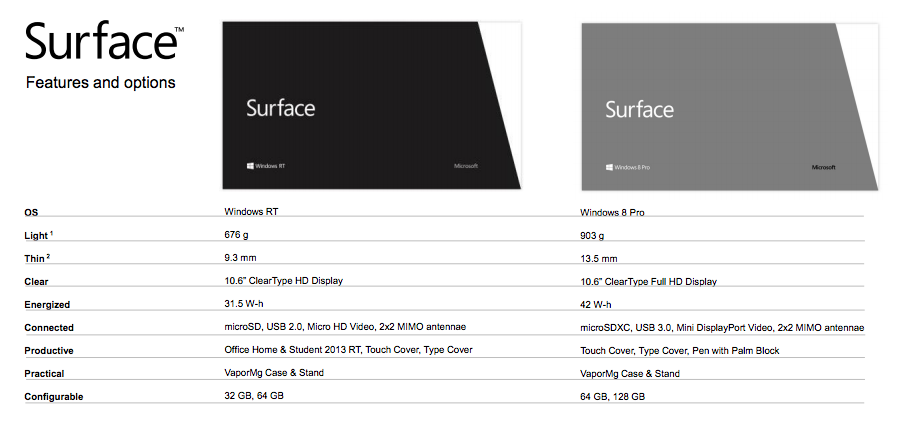
Even with the cover, the tablets are quite thin, as you can see here:


Surface tablets have 16:9 aspect ratio, a built-in kickstand and edges that are angled at 22 degrees, "a natural position for the PC at rest or in active use," Microsoft says. The casing uses "VaporMg" technology, "a combination of material selection and process to mold metal and deposit particles that creates a finish akin to a luxury watch." These are supposedly the first PCs with a vapor-deposited (PVD) magnesium case, which makes for a device that is thin, light, rigid, and strong.
Microsoft claims it's a tablet that's as great as a PC, and a PC that's as great as a tablet. As for availability, the Windows 8 RT tablet will be ready around the time of Windows 8 general availability, a few months from now. The Windows 8 Pro unit will ship a few months after the Windows RT One. They'll be sold in US-based Microsoft retail stores and online. Microsoft said suggested retail pricing will be competitive to a "comparable ARM tablet or Intel Ultrabook-class PC," but we don't know the exact prices yet.
So far, we're not seeing any indication of integrated 3G or 4G cellular connectivity. There are, however, some pretty pictures at the new Microsoft Surface site.
We'll have much more coverage of the new Windows 8 tablets tonight and tomorrow.
(Thanks to Jon Brodkins of Ars Technica)
http://arstechnica.com/information-technology/2012/06/microsoft-unveils-surface-tablet-powered-by-windows-8/
Monday, 18 June 2012
Apple's New iOS 6 : In Depth

iOS 6, the latest generation of Apple's mobile software for iPod touch, iPhone and iPad, has finally been unveiled - and from what we've seen so far, it's going to delight an awful lot of iOS users.
From badly-kept secrets to things that have been on wishlists for what seems like forever, here are the highlights.
The iOS 6 release date is Autumn
iOS 6 was released as a beta today, but the final version will ship "this Fall".

iOS 6 introduces Passbook
Passbook is Apple's new e-tickets app, enabling you to carry electronic tickets for anything from sports events to plane travel, or to have a digital loyalty card. The tickets update too, so for example your airline ticket would send you a notification once your departure gate was announced or changed. Hopefully enough firms will support this one to make it work for all our everyday bits and bobs.

iOS 6 has an improved phone app
The revised phone app offers smart reminders, so for example you can reject a call with a message saying you're busy, on your way, lost in a forest... You can also be reminded to call someone back when you leave your current location. The new Do Not Disturb mode is particularly nifty: when new messages arrive, they do so silently and without the screen lighting up. If you wish, you can also tell your iPhone not to silence calls from a list of favourite callers, or to automatically silent repeat calls from the same person.
iOS 6 has Facetime over 3G
To tell the truth, we're amazed it took so long. If this takes off, the mobile operators will be very sad. Unless we use it abroad, in which case they'll be dancing on great big piles of our money.

iOS 6 has a brand new Safari app
There are lots of useful improvements here: Instapaper-style offline reading, iCloud tab syncing and photo sharing website integration to make uploading less hassle. Less wonderfully, Smart App Banners enable websites to tell you about their sodding iOS apps more easily, which is just brilliant. Who among us hasn't thought, "man! I wish more websites told me about their iOS app on each visit!"?
iOS 6 Mail has VIPs and pull to refresh
Pull to refresh is here! Yay! You can also create a list of VIPs whose messages will appear on your device's lock screen and in a dedicated, separate mailbox. Sharing photos or videos from within Mail is finally here too, as are per-account signatures.
iOS 6 photo sharing is more selective
Instead of sharing everything with everyone, you can choose which photos should be shared with which people. We're not sure why you'd use this rather than, say, put a friends-only album on Facebook or Flickr. Anyone?
iOS 6 makes Siri more serious, and puts it in cars
Siri is able to understand a wider range of questions than before - the demo showed it understanding questions about sports scores, statistics and trivia, booking restaurants and finding out what's worth seeing at the cinema - but as yet it's unclear which, if any, of these features will make it to the UK. Local search is being rolled out worldwide, however, and there's support for more languages.
Siri is also going mobile: the new Eyes Free feature will put a Siri button on the steering wheel of Jaguars, Land Robers, BMWs, Mercs, Toyotas, Chryslers, Hondas, Audis and GM cars. The manufacturers have promised to support the feature in the next 12 months.
iOS 6 brings Siri to the iPad
...but only the new iPad.

iOS 6 has Facebook integration
Apple promises "the best Facebook integration ever in a mobile device", and to our eyes it looks pretty much the same as iOS 5's Twitter integration: you can post photos, locations, URLs and so on to annoy your friends. The API is public, so non-Apple apps can share to Facebook too, and you'll be able to see your Facebook friends' App Store recommendations.

iOS 6 has guided access for children
The new Guided Access feature enables you to disable certain parts of the screen so that children can't accidentally hit the wrong buttons. We're going to use it on the in-app purchase icons in every kid-targeted iOS game. Hahah!
iOS 6 has a new Maps app
New York, London, Paris, Munich, everybody's talking about - iOS 6 maps! Well, maybe not, but Apple's much-rumoured mapping system finally breaks cover. It's pretty, will have traffic information, doubles as a sat-nav system with turn-by-turn navigation, can be controlled via Siri and will probably be rubbish outside major metropolitan areas in the UK. Still, the new Flyover 3D views of major cities are lovely.

iOS 6 should be adopted very quickly
Unlike other mobile operating systems, iOS isn't dependent on mobile operators approving updates: as a result 80% of Apple's 365 million iOS customers are using the latest iOS, compared to 7% of Android users. Once iOS ships, expect a similarly speedy take-up.
iOS 6 doesn't work on everything
iOS 6 supports iPhones from the 3GS onwards, the fourth generation iPod touch and the second and third generation iPad. Check our story for more on iOS 6 compatibility.
Here are the rumours we reported on before the WWDC 2012announcement.
What hasn't been certain is what will be involved in the new platform – but we've sifted through the upcoming releases to see what's likely to appear, whether you'll be getting it and more importantly: the iOS 6 release date.
iOS 6 launch
If Apple doesn't release the new iOS 6 platform for iPad, iPhone and iPod touch this evening (spotted by T3), we'll be gobsmacked - and it will havewasted loads of money on all these signs.

So, we can probably expect to see the 'world's most advanced mobile operating system' unveiled at WWDC...
iOS 6 maps
 If you were a gambling type of person and had a very tech-savvy bookie, we'd recommend you pop a few dollar on this: Apple bringing out its own mapping application.
Not only has Apple acquired C3 3D mapping firm last year, but it also snapped up the likes of Placebase and Poly9, both companies involved in the same space – and moving into the mapping space would give Apple a fantastic leg up in the location-based services that are getting more and more popular every year.
The fact Google is launching its own 'next dimension' of Google Maps imminently is unlikely to be a coincidence, further backing up the rumour that Apple and Google are set to dissolve their partnership on the mobile side of things.
Facebook integration
There are strong, strong rumblings that Facebook is going to do what Twitter did with iOS 5 – namely, become more of an integral part of the iOS 6 experience.
TechCrunch is stating that integration with Zuckerberg's creation is a 'go' for the new release, but details of how far that integration will permeate through the iExperience are still vague.
What's most likely is being able to quickly share photos to Facebook from the Photo app in the same way as Twitter – whether Apple takes the next step and allows features like autosharing, contact integration or offline access to Facebook albums remains to be seen.
Either way, it's a massive coup for Facebook as it looks to get more involved in the mobile space – perhaps this can stop the pesky rumours of a forthcoming Facebook phone.
Siri coming to the iPad
We were verging on the gobsmacked when the new iPad 3 didn't launch with Siri – instead we got the less-exciting Voice Dictation instead.

However, according to 9to5Mac the experience will be massively improved by adding in all the functionality of Siri on the iPhone 4S (minus the phone business), allowing instant search, music control and more by a simple long-press of the home button.
But how will it look? According to the same sources, the app won't run in full screen, instead popping up from the bottom of the display to show you the information you requested.
Which, let's face it, will quickly be setting alarms and timers and the odd voice search when you've heard certain questions evoke comedic responses from Siri.
Enhanced email and Do Not Disturb
OS X Mountain Lion seems to be something of an inspiration for the forthcoming release of iOS 6, with a couple of sensible features likely to be added, so says a 9to5Mac source.
The first is VIP Mail, which allows you to tag the key people you talk to most (or your boss) and make sure their mail is front and centre when you pop open the Mail app.
This is the same system we've seen within HTC Sense and work very nicely, especially as you're able to group your contacts accordingly.
It's also an automatic feature in Google Mail these days, and as such we'd now expect it from Apple too.
The other is Do Not Disturb: allowing you to turn off notifications when you're looking to do things like run full screen apps or just not bother with getting bugged on the way home.
Whether it will be offered to become part of apps' design remains to be seen – or if users will have to toggle it manually.
iCloud Tabs
In the same way that Android has live synchronisation to the Chrome Browser, Apple apparently wants to repeat the trick with iOS 6 and Mountain Lion, which will be a simple synchronised list of opened tabs between the devices.
The button will be kept in the Bookmarks toolbar to give access to the relevant tabs – but whether the feature will be available for users of Safari on other non-Apple devices is still uncertain.
Live icons?
This is a biggie, and would be the equivalent of the notifications bar coming to iOS 5 – basically bringing one of the best bits of Android to the Apple mobile OS.
So it makes sense that Apple could look to Windows Phone's Live Tiles and think: 'we'll have a bit of that'.
We've spoken to a number of UI designers from the Android and Windows Phone camps who have criticised the way Apple's icons are pictures of information waiting to be opened, rather than the picture itself.
Of course, Apple has always been about simplicity, and app icons that change too frequently might confuse some users, but the option to make some apps more widget-like would appease the legions of iFans that have looked on with quiet envy at their friends' Android devices.
iOS 6 release date
The iOS 6 release date is still very much up in the air – but some sites are claiming it will be as late as autumn, which plays very much into a mooted iPhone 5 release date of October.
However, it's unlikely Apple will wait that long to launch something it announces in June (especially when iPad and iPhone users will have ready-to-use devices), so expect the iOS 6 release date to be somewhere in July or August… and the chances of seeing an iPhone 5 then don't look too outlandish either.
Of course, if you're running the older Apple hardware (and by that we meaniPhone 3GS and older, plus probably the first iPad) you won't get access to the new iOS 6 if previous form is anything to go by.
Update: it seems you lucky 3GS owners are getting a reprieve - here's hoping Apple has at least optimised the new platform so you're not subject to terrible slowdown.
(Thanks to Gary Marshall of TechRadar)
World's Fastest Super Computer
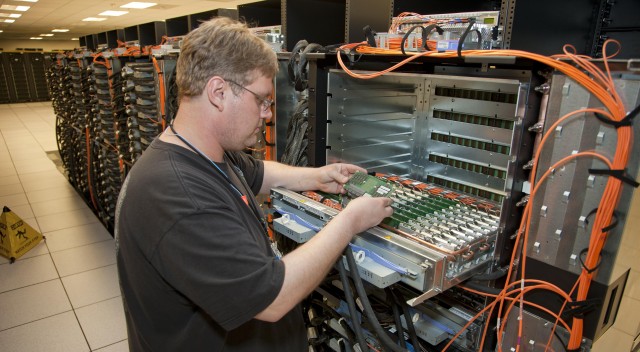 |
| An IBM technician loads CPUs into Sequoia, the world's fastest supercomputer |
Every six months, Earth’s biggest supercomputers have a giant race to see which can lay claim to being the world’s fastest high-performance computing cluster.
In the latest Top 500 Supercomputer Sites list unveiled Monday morning, a newly assembled cluster built with IBM hardware at the Department of Energy’s Lawrence Livermore National Laboratory (LLNL) takes the top prize. Its speed? A whopping 16.32 petaflops, or 16 thousand trillion calculations per second. With 96 racks, 98,304 compute nodes, 1.6 million cores, and 1.6 petabytes of memory across 4,500 square feet, the IBM Blue Gene/Q system installed at LLNL overtakes the 10-petaflop, 705,000-core “K computer” in Japan's RIKEN Advanced Institute for Computational Science.
The Japanese computer had been world’s fastest twice in a row. Before that, the top spot was held by a Chinese system. The DOE computer, named “Sequoia,” was delivered to LLNL between January and April. It's the first US system to be ranked #1 since November 2009.
To get to 16 petaflops, Sequoia ran the Linpack benchmark for 23 hours without a single core failing, LLNL division leader Kim Cupps told Ars Friday in advance of the list’s release. The system is capable of hitting more than 20 petaflops—during the tests it ran at 81 percent efficiency.
“For a machine with 1.6 million cores to run for over 23 hours six weeks after the last rack arrived on our floor is nothing short of amazing,” she said.
The cluster is extremely efficient for one so large, with 7,890 kilowatts of power, compared to 12,659 kilowatts for the second-best K Computer. It’s primarily cooled by water running through tiny copper pipes encircling the node cards. Each card holds 32 chips, with each chip having 16 cores.

Sequoia's architecture.
The entire cluster is Linux-based. Compute Node Linux is run on nearly 98,000 nodes, and Red Hat Enterprise Linux runs on 768 I/O nodes which connect to the file system, Cupps said.
To start, the cluster is on a relatively open network, allowing many scientists to use it. But after IBM’s debugging process is over around February 2013, the cluster will be moved to a classified network that isn’t open to academics or outside organizations. At that point, it will be devoted almost exclusively to simulations aimed at extending the lifespan of nuclear weapons.
“The kind of science we need to do is lifetime extension programs for nuclear weapons,” Cupps said. “That requires suites of codes running. What we’re able to do on this machine is to run large numbers of calculations simultaneously on the machine. You can turn many knobs in a short amount of time.”
Blue Gene/Q uses a PowerPC architecture that includes hardware support for transactional memory, allowing more extensive real-world testing of technology.
In November 2011's Top 500 list, three of the top five clusters used NVIDIA GPUs (graphics processing units) in combination with CPUs to achieve very high speeds. This time around, only one of the top five integrates GPUs, although the overall number in the Top 500 integrating GPUs or similar accelerators rose from 39 to 58.
The use of GPUs in supercomputing tends to be experimental so far, said Dave Turek, IBM vice president of high performance computing. “The objective of this is to do real science,” he said. GPUs are a bit more difficult to program for, he said.
While the majority of Top 500 computers use Ethernet or Infiniband as their primary interconnects, Sequoia uses IBM’s proprietary 5D Torus. It's an optical network that provides 40 Gbps throughput to IBM’s Blue Gene/Q clusters. I/O nodes are connected to the file system via Infiniband and the management network uses Ethernet, Cupps said.
IBM leads the Top 500 list with 213 systems, ahead of HP’s 138. Nearly 80 percent—372 of the 500 systems—use Intel processors, followed by 63 using AMD Operton and 58 using IBM Power.
Three DOE systems are in the top 10. The rest hail from Japan, Germany, China, Italy, and France. All 10 have performance of at least at least 1.27 petaflops.
Petascale computers have become relatively commonplace since the IBM Roadrunner system at Los Alamos National Laboratory was the first to hit a petaflop in 2008. In fact, each of the top 20 systems on the new list hit at least a petaflop. Exascale, which would be 1,000 times faster, is the next big breakthrough for the IBMs, HPs, and Crays of the world to aspire to.
But a big advance in price-performance is necessary. Today’s technology could scale up a lot higher—it just wouldn’t be practical. Supercomputers are naturally expensive (even more expensive than the new MacBook Pro). The K Computer in Japan, for example, cost more than $1 billion to build and $10 million to operate each year. Livermore reportedly spent $200 million on Sequoia.
“We could get another order of magnitude with this technology if someone would write a check,” Turek said. “But no one would want to write that check.”
(With thanks to Jon Brodkin of Ars Technica)
Sunday, 17 June 2012
China to build world's tallest building

Broad Sustainable Building (BSB) is an innovative Chinese architectural firm whose mission is to erect "medium-cost, super-saving utility buildings and to promote a futuristic urban lifestyle." They are planning to build the world's tallest building, the Sky City Tower in Changsha, Hunan, whose 220 storeys will be erected in 90 days. The timelapse video above shows another BSB project, a 30-storey hotel that went up in 15 days. The company claims its designs are extremely seismically robust and environmentally efficient. From CNNGo:
Its 220 stories will provide a total of 1 million square meters of usable space, linked by 104 elevators.
Zhang said Sky City is expected to consume a fifth of the energy required by a conventional building due to BSB’s unique construction methods, such as quadruple glazing and 15-centimeter-thick exterior walls for thermal insulation.
The company's construction methods also seem to save money.
According to Chinese newspaper 21 Century Business Herald, the total investment in Sky City is RMB 4 billion (US$628 million), compared with US$1.5 billion on Burj Khalifa and US$2.2 billion on Shanghai Tower.
Microsoft Xbox 720 Leaked

- Tagline is " All Your Entertainment. One Box".
- Next Gen AAA games ( 4 to 6 times AWESOME than current titles)
- 2nd Gen Kinect sensor with "closer, wider, deeper" 3D play space, 4 player tracking
- Improved HD RGB camera
- Priced at $299
FORTALEZA
Fortaleza appears to be a codename for a virtual reality project that feature WiFi enabled glasses that are being planned for Xbox 720. These glasses will have a cell radio and 4G connectivity and are like mini-consoles in themselves, you can call them mobile hubs for Xbox contents. In simple words you wont even need console to connect to Xbox games and media and could be delivered to you from cloud "instantly and on any screen".
Saturday, 16 June 2012
4 Reasons to Eat Whole Egg
Planning on going to diet throwing yolks and eating whites, wait maybe there are after all some reasons you should eat whole egg


- One whole egg contains 185 milligrams of cholesterol (egg whites contain none). The daily recommended cholesterol limit is less than 300 milligrams for people with normal LDL (bad) cholesterol levels, so you can enjoy a whole egg each day, as long as you don't go overboard on other cholesterol-filled foods such as meat and dairy products.
- The white part of the egg may contain most of the protein, but the yolk contains most of the egg's nutrients. One yolk has 21.9 mg of calcium, 245 IU of Vitamin A, 18 IU of vitamin D, 66.3 mg of phosphorus, and 24.8 mcg of folate.
- Having eggs for breakfast can help you lose weight. One egg is only 92 calories but offers 6.3 g of protein to give you sustained energy all morning long, so you're less likely to hit a mid-morning slump and feel the need to reach for a not-so-healthy pick-me-up.
- Healthy fats are essential to our bodies and if you choose eggs fortified with omega-3 fatty acids, it's an easy way to increase your intake of these polyunsaturated fatty acids in your diet.
Governments's ChemTrails

Thursday, 14 June 2012
The Shape Shifting Sand
Wednesday, 13 June 2012
The Brain & The Computter

The Spider Swing

Monday, 11 June 2012
Where to Start !!! :(

So now I decided to check my luck and ask people what they want or discuss and we can do that until we are lost again or If somebody is feeling all gloomy and depressed and feels like talking to anyone just come over to my (web) space.
P.S. Dont give me BS
Subscribe to:
Posts (Atom)