addictivity.wordpress.com

Friday, 22 June 2012

Thursday, 21 June 2012
3 Ways to Get Competitive and Burn More Calories While You Run

- Beat your own pace: Who says you have to compete with someone else? If you feel weird going up against another person, then go up against yourself. One way is to track your time for a certain number of miles, and the next time you run, see if you can shed a few seconds off your time. Running at a faster pace will burn more calories and tone your lower body.
- Rack more miles than your running buddy: Challenging a running buddy is also a great way to be competitive while also keeping it fun and friendly. You can do it even if you don't run together! Try this: see who can run more miles in a week. You can follow the honor system and track your miles, or make a game of it using the Nike+ GPS running app ($2). Just tap "Outrun Your Friends," and whoever runs the shortest distance is "IT." Even if you don't beat your friend, you'll probably end up running more miles than you would if you weren't competing, and more runs mean more total calories burned.
- Outlast a stranger: To make it even more exciting, race against an unknowing stranger. This works best at the gym since there are always other people on the treadmill, but you can also do it outdoors if you can find a park or other place with many other runners. Find someone who's starting around the same time as you and see if you can either beat their pace or their mileage. You'll secretly hear the crowd applauding in your head when they stop running and you're still going strong. But you'll also end up running faster or longer, which translates to a bigger calorie burn.
Wednesday, 20 June 2012
Powdered Drinks, iPhone Shortcuts, and Exploding Laundry Detergent

Avoid Clumps in Powdered Drinks by Pouring Slowly
Here's a simple but effective method for avoiding the clumping when you use those "just add to bottled water" packets of Gatorade and the like. Pour slowly. When I rush and just dump it in, it always clumps. And when it happens it's usually at the bottleneck making it a real challenge to properly shake so it dissolves thoroughly. If you pour slowly you avoid the clumping almost completely. I say almost because not all of these drink mixes are created equal. The ones that are harder to dissolve will likely be harder to avoid clumping with in its entirety. All this said, the mix can just settle to the bottom and clump there, so you might mix in a little, give it a swirl, then mix in some more. Either way, it's easier than the alternative I've described.
Bonus tip that I read right off the bottle. Take a sip or two before adding the mix. If it does clump, it won't be in the bottleneck and shaking will be easier. And you avoid the mess of getting concentrated, wet mix all over the mouth of the bottle (and in my case, the lid and my finger as well).

Bonus tip that I read right off the bottle. Take a sip or two before adding the mix. If it does clump, it won't be in the bottleneck and shaking will be easier. And you avoid the mess of getting concentrated, wet mix all over the mouth of the bottle (and in my case, the lid and my finger as well).

Use iOS' Text Expansion for Usernames and Passwords
The Shortcuts feature in the iPhone keyboard settings is a great place to store frequently used user data for login forms or sign up pages. Just add a new shortcut and make the phrase section what you want to fill out with a corresponding shortcut.
For example, I use "em" as my email shortcut so on any form I fill out I just have to type "em" and it drops my email in.
I also have "pw" set up for a password and use "addy" for my street address


For example, I use "em" as my email shortcut so on any form I fill out I just have to type "em" and it drops my email in.
I also have "pw" set up for a password and use "addy" for my street address

Keep Detergent Bottles Off the Top of Your Laundry Machine to Avoid Spills
So I get home and head to the bathroom and this is what I see: laundry detergent all over the floor and walls.. It turns out the detergent bottle fell off from the top of the dryer (it's one of those stacked units). It must have just inched closer and closer to the edge during all of those vibrations and then just fell off. So here's my Lifehacker tip: DON'T SET LAUNDRY DETERGENT ON TOP OF STACKED WASHER/DRYER UNITS. Bad things will happen.

Use a Plain Black Image to "Turn Off" Mobile Wallpaper
This will definitely be old old news to anyone who has owned PMPs or mobile phones for a long time. I have to tread carefully and mind the geeks.
MY new Sony Walkman doesn't have a "no wallpaper" option. So I used a program to create a new empty image colored black, at 640x480, gave it a jpg extension, sent it to the player, and set *that* as wallpaper. Much better, I think.
If anyone wants to do this, the details are really going to vary. I used IrfanView on Win7 to create the image, but anything will surely do for the same task. And of course, it's going to vary one whole 888 of a lot on the player itself. I have the NWZ-E465 player. Anything else in that series ought to let you use the Option button to bring up a mini context menu when you're viewing a pic, and an entry to set that pic as wallpaper.
(Source : LifeHacker - http://lifehacker.com/5920069/powdered-drinks-iphone-shortcuts-and-exploding-laundry-detergent/)
MY new Sony Walkman doesn't have a "no wallpaper" option. So I used a program to create a new empty image colored black, at 640x480, gave it a jpg extension, sent it to the player, and set *that* as wallpaper. Much better, I think.
If anyone wants to do this, the details are really going to vary. I used IrfanView on Win7 to create the image, but anything will surely do for the same task. And of course, it's going to vary one whole 888 of a lot on the player itself. I have the NWZ-E465 player. Anything else in that series ought to let you use the Option button to bring up a mini context menu when you're viewing a pic, and an entry to set that pic as wallpaper.
(Source : LifeHacker - http://lifehacker.com/5920069/powdered-drinks-iphone-shortcuts-and-exploding-laundry-detergent/)
Facebook user numbers dwindling

Last month, Facebook attracted 158.01 million unique visitors in the United States, edging lower from 158.69 million in April and 158.93 million in March, comScore said.
Keeping users coming back -- or combating fatigue -- is crucial for all social media services, analysts say. Facebook is consistently trotting our new features, including the "Timeline" interface rolled out this year, and more are expected with the deal to acquire popular photo-sharing app Instagram.
ComScore has changed how it counts users, making year-ago comparisons harder. Under its old methods, comScore previously said Facebook had 157.22 million visitors in May 2011, which would make Wednesday's data a year-on-year increase of just 0.5 percent.
The changes comScore made generally reduce user numbers, so in an apples-to-apples comparison, user growth would look slightly bigger, a comsScore spokesman said.
Users spent an average of 380.8 minutes, or more than six hours, on the site in May this year, up slightly from 378.9 minutes in April.
In April last year, as measured under comScore's old techniques, users spent 374.9 minutes on the site.
Facebook was heavily criticized for the handling of its initial public offering in May, and critics have also questioned the efficacy of its ads.
One oft-cited reason for buying Facebook stock was the company's rapid growth.
The company's shares debuted at $38, but dipped well into the $20s before recovering some ground in recent weeks. On Wednesday shares closed at $31.60, down about 1 percent.
About two out of five people polled by Reuters and Ipsos Public Affairs said they used Facebook every day. Nearly half of the Facebook users polled spent about the same amount of time on the social network as six months ago.
Tweak Your Jailbroken iPhone to Look and Act More Like iOS 6

If you've seen a few screenshots of iOS 6, you know Apple's made some nice interface enhancements, such as a better sharing menu, dialer, and music player. If you've got a jailbroken iPhone running iOS 5, you can bring those changes to your device right now.
.

One of the smaller but very welcome changes in iOS 6 is the way you share things. Instead of getting a long list of buttons, you now get a grid of labeled icons that looks a lot like your home screen. This is a better, more visual approach to sharing. To get this feature on your iPhone right now, you just need to search Cydia for a tweak called iOS 6 Photo Sharing Menu (Free).
After you install it, you don't need to do anything other than try to share a photo. Open up your Photos app and give it a try. You'll be presented with the grid you see to your right. You'll notice it includes Facebook sharing, which is a new option in iOS 6. While this button won't work as seamlessly as it will in the real upgrade, it does function. You'll just be sent to Safari to authorize Facebook sharing through the tweak and then you'll be able to directly share your photos without issue.
 If you really want your iPhone to adopt the new interface elements in iOS 6, you're going to need the iOS 6 Winterboard theme. To get it, just search Cydia for iOS 6 and it'll come right up. You can install elements, such as the music player and dialer, separately if you want, or you can just get the entire package. You'll need Winterboard to actually use this theme, but if you don't already have it installed, Cydia will take care of that for you when you attempt to add the iOS 6 theme itself.
Once you've got everything installed, your device will reboot. When it's back up and running, look for Winterboard on your home screen. Open it up, check off the tab labeled "iOS 6," and tap the Respring button. Your home screen will reload and you won't notice anything new outright, but if you open up the Phone or Music app you should see the changes right away.
Source : LifeHacker
 If you've seen a few screenshots of iOS 6, you know Apple's made some nice interface enhancements, such as a better sharing menu, dialer, and music player. If you've got a jailbroken iPhone running iOS 5, you can bring those changes to your device right now.
 .
Add iOS 6's Improved Sharing Menu

After you install it, you don't need to do anything other than try to share a photo. Open up your Photos app and give it a try. You'll be presented with the grid you see to your right. You'll notice it includes Facebook sharing, which is a new option in iOS 6. While this button won't work as seamlessly as it will in the real upgrade, it does function. You'll just be sent to Safari to authorize Facebook sharing through the tweak and then you'll be able to directly share your photos without issue.
Add iOS 6's Interface Elements
Once you've got everything installed, your device will reboot. When it's back up and running, look for Winterboard on your home screen. Open it up, check off the tab labeled "iOS 6," and tap the Respring button. Your home screen will reload and you won't notice anything new outright, but if you open up the Phone or Music app you should see the changes right away.
Source : LifeHacker
Tuesday, 19 June 2012
What's in Microsoft's new Surface tablet

Not actually a Surface.
Microsoft's intent with the Surface tablets is to create hardware that puts the software front and center; to provide the hardware necessary to allow Windows 8's strengths to really come to the foreground. At the launch event, however, the software took the back seat. This was all about the hardware, and with good reason.
The Surface tablets are smart, good-looking, carefully considered, well built, slick pieces of kit, and there's nothing even close on the market today. Of course, they're not on the market today either, but unless the PC OEMs inject a serious dose of quality in their their build and design processes, the Surface units will stand alone when they eventually go on sale.
Microsoft still isn't ready to let Joe Public get their grubby little hands on Surface. At the press event, we were given a number of demonstrations, shown a number of non-functional demo units, and given scant few seconds to touch real working devices. The Intel Core i5-powered Surface for Windows 8 Pro devices were not on display, either; only the ARM-powered Surface for Windows RT was available. However, the major design points are common between the two.
Surface for Windows RT's basic specs set the scene. It's 9.3 mm thick, has a mass of 676 grams, and sports a 10.6" 1366×768 screen. That puts it in the same size and weight ballpark as the iPad, though with a lower resolution 16:9 screen instead of the iPad's high-resolution 4:3 display. From a size and portability perspective, the Surface gets it right, but that's not unique.
What makes Surface special is the attention to detail. The standard of the fit and finish of the prototypes on display was extremely high. The shell of the Surface is made of cast magnesium, with a vapor-deposited finish called VaporMg. The result is an attractive, scratch-resistant finish that's easy to grip and comfortable to hold.
The company explained that its casting and finishing process allows it to create edges as thin as 0.65 mm—less than the thickness of a credit card—and that these narrow castings and tight tolerances are essential to the device. Put a piece of sticky tape inside the Surface when you assemble it, and the finished product will bulge, it's so tightly packed together.
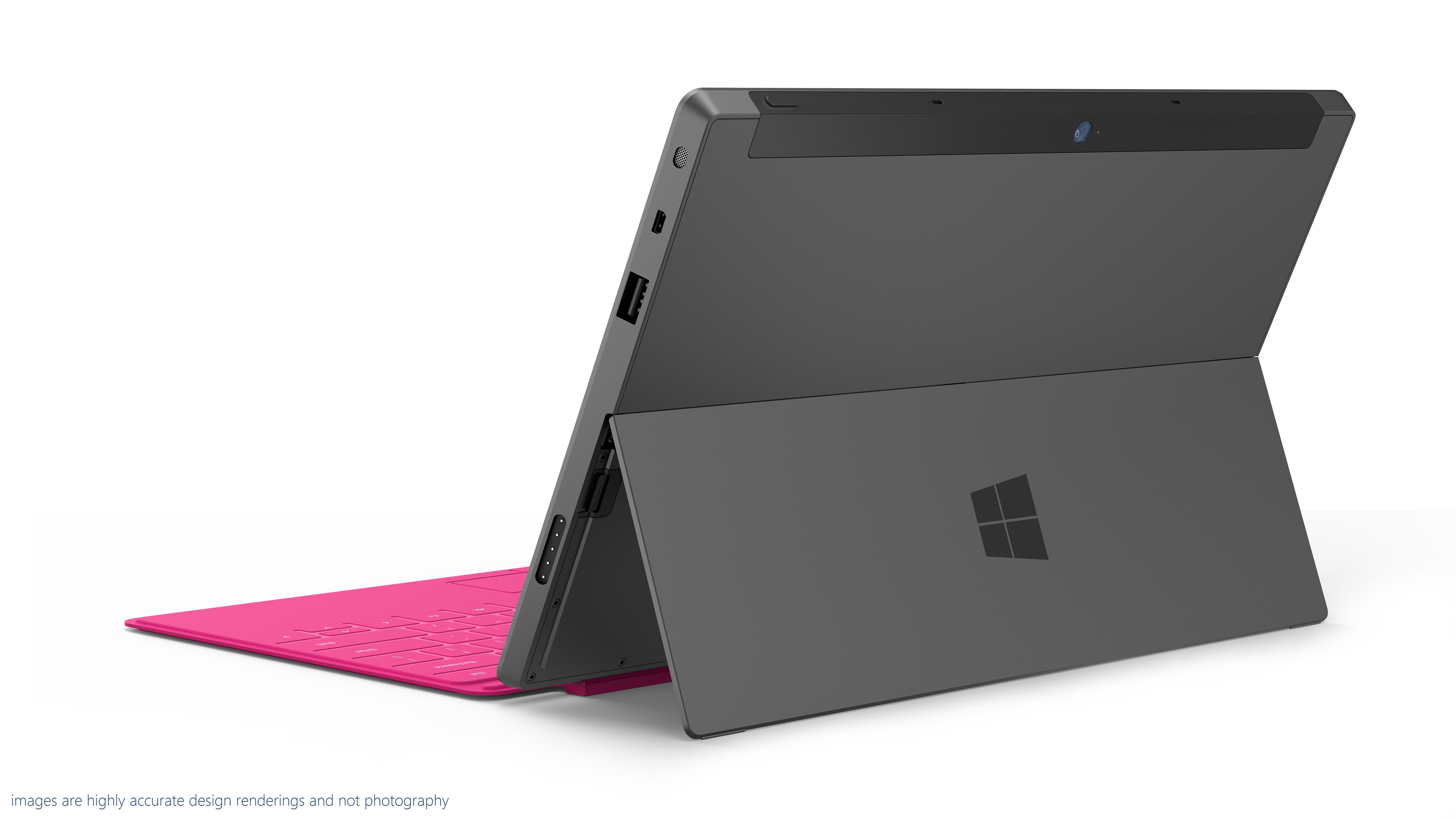

The small chamfer on the edge allows easy opening of the kickstand.
Another feature that was mentioned repeatedly was an angle; 22 degrees. The edges of the device are all chamfered at 22 degrees, an angle that Microsoft says makes the hardware fade into the background and comfortable to hold (though we'd have to have a lot more time with it to see if that's really true in practice). The kickstand also holds the screen at 22 degrees.
On its own, the angle is no big deal. But the attention to detail comes into play. The Surface has front and rear cameras. The rear cameras isn't, however, mounted so that it looks out perpendicular to the case. It's angled at 22 degrees too, so that when using the kickstand, the cameras looks straight out, rather than down.
If the company was pleased with the kickstand, it was positively boastful about the Surface's pair of combination keyboard-covers. There's the Touch Cover, available in five colors (grey, white, blue, pink, and orange), which integrates a multitouch keyboard into a 3 mm thick screen cover, and the Type Cover, which integrates a real keyboard with keyswitches into a slightly thicker cover.
Touch Cover has no keyswitches. It's based on pressure sensors, with the "keys" distinguished from each other with a different texture. There's plenty of smarts in the Touch Cover. Touch typists tend to rest their fingers on the home row. With a naive touch keyboard, that results in a lot of stray key presses. The pressure applied during real keypresses is different, however, from that of resting on the home row, and the logic in the keyboard can tell the difference.
The keyboards also include gyroscopes so they can tell when they've been folded back behind the Surface, so that they can be disabled when tucked out the way.
How well does all this cleverness work? That we don't know. Microsoft says that the Touch Cover allows typing speeds twice as fast as those possible on glass, but until we can actually use one, the company's claim is untested.
Both covers connect to the Surface with a satisfyingly solid magnetic connector. It's designed to mate automatically without requiring careful alignment, and that certainly worked well.

The magnetic connector snaps together with ease.
(Thanks to Peter Bright of Ars Technica)
http://arstechnica.com/information-technology/2012/06/a-first-look-and-feel-of-microsofts-first-pc/?utm_source=feedburner&utm_medium=feed&utm_campaign=Feed%3A+arstechnica%2Findex+%28Ars+Technica+-+All+content%29
New Microsoft Surface Tablet

Make that two tablets. One Windows RT tablet runs an NVIDIA Tegra 3 ARM processor and the other Windows 8 Pro tablet runs Intel's Ivy Bridge Core i5 chips. One thing that looks really cool are new magnetic covers that are quite reminiscent of Apple's "Smart Cover" for the iPad. But it's a lot smarter—Microsoft's cover actually includes a multitouch trackpad and a keyboard. There are two, as we explain in this story: a Touch Cover with virtual keys and a Type Cover with a tactile keyboard and touchpad.
Typing on the cover is twice as efficient as typing on glass, according to Microsoft. There's also a stylus.
10.6-inch devices running Windows 8, the "Surface" tablets borrow their name from Microsoft's table-sized computer that's been an impressive yet niche product for the past few years. (The original Surface has been renamed to PixelSense in a possible attempt to avoid confusion.) In announcing the new tablets, CEO Steve Ballmer stressed that Microsoft has been a hardware company for decades, with mice, keyboards, webcams, and of course the Xbox, among many others.
While Microsoft typically lets hardware partners build Windows-powered PCs and tablets, Surface hardware is built by Microsoft. "Things work better when hardware and software are considered together," Ballmer said. In what is perhaps a nod toward Apple's so-called "Retina Display" marketing term for high-definition screens, Microsoft said the displays are so good that your eye won't be able to distinguish individual pixels. The exact resolution is unconfirmed, but we do know the tablets feature Gorilla Glass.
"Much like Windows 1.0 needed the mouse, we wanted to give Windows 8 it's own companion hardware innovation," Ballmer said.
Here are the specs for the two tablets:
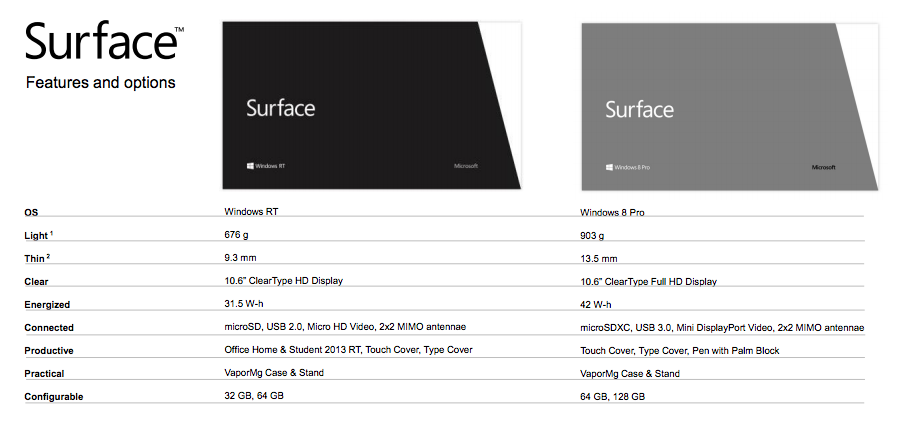
Even with the cover, the tablets are quite thin, as you can see here:


Surface tablets have 16:9 aspect ratio, a built-in kickstand and edges that are angled at 22 degrees, "a natural position for the PC at rest or in active use," Microsoft says. The casing uses "VaporMg" technology, "a combination of material selection and process to mold metal and deposit particles that creates a finish akin to a luxury watch." These are supposedly the first PCs with a vapor-deposited (PVD) magnesium case, which makes for a device that is thin, light, rigid, and strong.
Microsoft claims it's a tablet that's as great as a PC, and a PC that's as great as a tablet. As for availability, the Windows 8 RT tablet will be ready around the time of Windows 8 general availability, a few months from now. The Windows 8 Pro unit will ship a few months after the Windows RT One. They'll be sold in US-based Microsoft retail stores and online. Microsoft said suggested retail pricing will be competitive to a "comparable ARM tablet or Intel Ultrabook-class PC," but we don't know the exact prices yet.
So far, we're not seeing any indication of integrated 3G or 4G cellular connectivity. There are, however, some pretty pictures at the new Microsoft Surface site.
We'll have much more coverage of the new Windows 8 tablets tonight and tomorrow.
(Thanks to Jon Brodkins of Ars Technica)
http://arstechnica.com/information-technology/2012/06/microsoft-unveils-surface-tablet-powered-by-windows-8/
Subscribe to:
Posts (Atom)